Chrome extensionNew

KosmosSafe Browsing

Warns you before the phishing page opens.

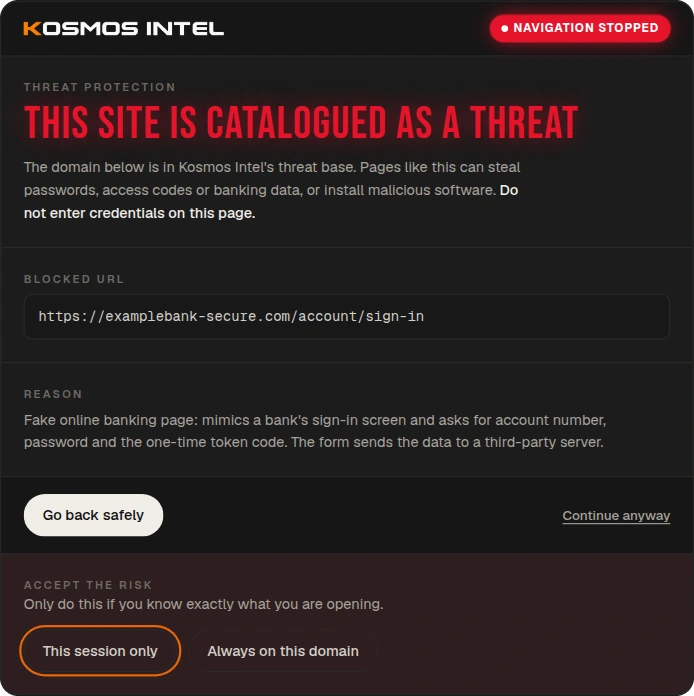
Every domain you visit is checked against the Kosmos Intel threat database. If it is catalogued, navigation stops before the page loads — and you see the blocked address and the reason.

  • Free, no account
  • Version 1.5.0
  • PT · EN · ES

Chrome, Edge, Brave and other Chromium-based browsers.

Kosmos Safe Browsing warning page: this site is catalogued as a threat
between one list update and the next
5 min
of SHA-256 is all that is stored per domain
3 bytes
addresses sent to the server
0
languages, following the browser
3
How it works

Between the click and the page

The check happens in your browser, in the gap between opening the link and the page starting to load.

  1. 01

    You open the link

    In an email, on WhatsApp, in an ad. The extension picks up the destination domain — even after server-side redirects.

  2. 02

    Local check

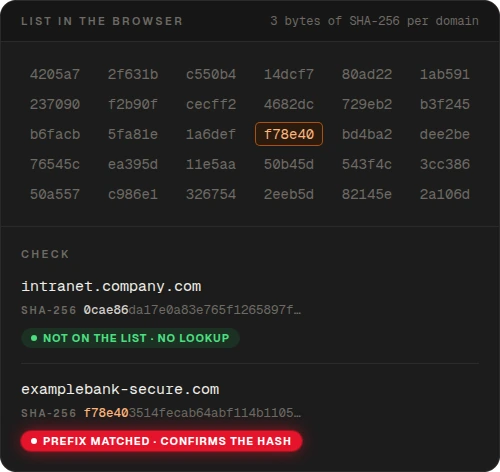
    The domain's SHA-256 is compared with the prefix list stored in the browser. A site that is not on the list triggers no request at all.

  3. 03

    The page never opens

    If a prefix matches and the server confirms the full hash, the warning takes the place of the site before it loads.

In the icon

Protection in plain sight, one click away

The icon shows whether you are protected, off or signed out. The popup tells you which site is open now, how many domains are on the list and when it last synced.

  • Threat list updated on its own, every 5 minutes
  • Option to warn only about threats confirmed as malicious
  • Allowed domains visible and removable in the popup
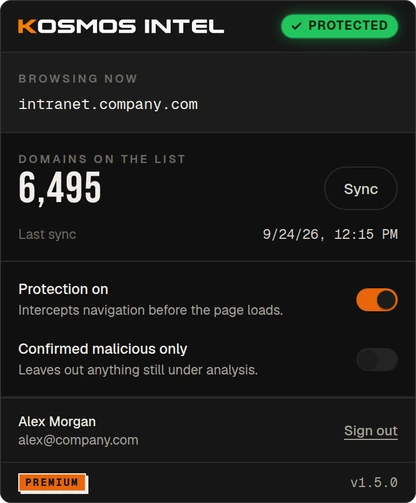
Kosmos Safe Browsing popup with protection on and 6,495 domains on the list
Privacy by design

The browser keeps only hash prefixes

No domain is stored as text in the browser: the extension keeps the first 3 bytes of the SHA-256 of each one. When a site matches a prefix, only the full hash goes to the server — never the address, the page content or what you type.

  • A site that is not on the list triggers no server request
  • Copying the extension's storage does not give away the list
  • No ads, no tracking, no data sales
Privacy policy
Hash prefixes stored in the browser and the check of two domains
Your call

Go back safely or take the risk

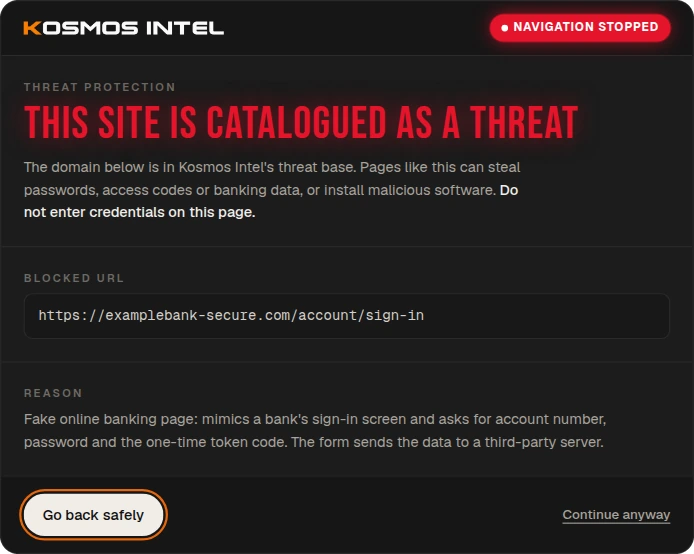
The warning does not lock anyone out. If you know exactly what you are opening, you can proceed — for this session only or by allowing the domain for good.

  • "Go back safely" is always the main button
  • "This session only" expires when the browser closes
  • On Premium, the classification reason is written by the analysts
Warning with the options to continue for this session only or always on this domain
Free and Premium

Free for everyone

Works without an account. Tesseract customers get Premium just by being signed in to the panel in this browser.

Free
Free
No account, no sign-up
  • Domains from phishing incidents investigated by Kosmos Intel
  • Warning before opening catalogued domains and subdomains
  • Blocking also when the site arrives through a redirect
  • List updated every 5 minutes
Add to ChromeIt's free
Tesseract customers
Premium
Included
Just be signed in to the Tesseract panel
  • Everything in Free
  • Kosmos Intel global database of indicators of compromise (IoCs)
  • Reason for each classification, written by the analysts
  • Connects on its own when you sign in to the panel
Talk to Kosmos

Protect your browser now

One click in the Chrome Web Store and it is installed. No account, no setup.

Privacy policy
Kosmos Safe Browsing
Offered by Kosmos Intel
Extension · Privacy & security
Category
Privacy & security
Version
1.5.0
Size
131 KiB
Languages
Portuguese, English and Spanish